
MonsterWin Login Guide
Creating your account takes just 3-5 minutes with our streamlined registration system. The MonsterWin login process works identically across desktop, mobile, and tablet devices, providing Canadian players from Vancouver to Halifax with consistent, secure access. We protect all personal information with 128-bit SSL encryption from registration through every gaming session.
Registration requirements
To create your MonsterWin Casino login, you must be at least 19 years old (18+ in Alberta, Manitoba, and Quebec) and be a Canadian resident. Only one account per person, household, or IP address is permitted under our terms of service.
Step-by-step MonsterWin login creation
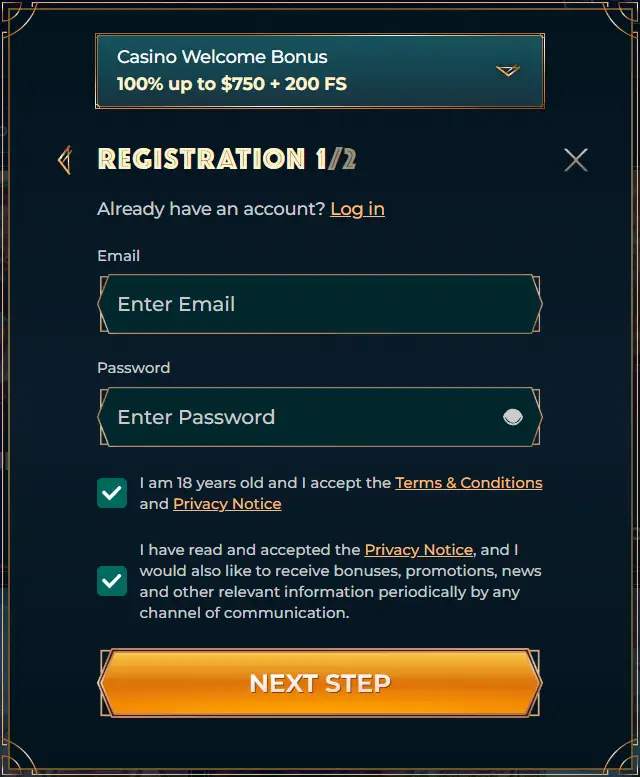
Follow these simple steps to complete your registration:
- Access registration: Click the Register button in the top right corner of our homepage.
- Enter email and password: Provide your email address and create a secure password.
- Personal information: Fill in your full name, date of birth, phone number, and complete address.
- Select currency: Choose CAD to avoid conversion fees.
- Verify Email: Check your inbox and click the verification link to activate your account.
Your account is created instantly upon submission. Email verification must be completed before making deposits or playing games.
KYC procedures in MonsterWin
Before your first withdrawal, you’ll complete our Know Your Customer (KYC) verification by uploading documents through your account dashboard:
| Document Type | Acceptable Options | Requirements |
|---|---|---|
| Photo ID | Driver’s license, passport, PR card | Valid, unexpired, clearly visible |
| Proof of Address | Utility bill, bank statement | Dated within 90 days |
| Payment Verification | Card photo, bank statement | Shows last 4 digits |
Our team reviews submissions within 24-48 hours and notifies you by email once approved. This one-time process ensures secure withdrawals and protects against unauthorized access.
How to Access Your MonsterWin Casino Login
Once verified, accessing your account is straightforward:
- Navigate to the MonsterWin Casino website.
- Click Login in the top right corner.
- Enter your registered email address.
- Type your password (case-sensitive).
The mobile MonsterWin login follows identical steps with a touchscreen-optimized interface. Save our website to your home screen for one-tap access that feels like a native app.
Login Security Features
We implement multiple security layers to protect your account:
- Two-factor authentication: Optional 2FA adds verification via email or SMS when logging in from new devices.
- Device recognition: Our system remembers trusted devices for faster future logins.
- Auto-logout: Inactive sessions automatically log out after 30 minutes for security.
- Password encryption: All credentials are encrypted and never stored in plain text.
Making your first deposit to MonsterWin

After completing your MonsterWin Casino login, fund your account through the Cashier section. Canadian players enjoy multiple payment options:
| Payment Method | Minimum | Processing | Fees |
|---|---|---|---|
| Interac e-Transfer | $20 CAD | Instant | Free |
| Visa/Mastercard | $20 CAD | Instant | Free |
| Cryptocurrencies | $15-45 CAD | 15-30 min | Network only |
| E-Wallets | $20 CAD | Instant | Free |
Your first deposit of $20 CAD or more qualifies for our 100% welcome bonus up to $750 CAD plus 200 free spins, credited instantly upon confirmation.
Account security best practices
Maintain strong account security by following these recommendations:
- Use unique passwords of at least 12 characters with mixed character types
- Never share your password with anyone, including support staff
- Enable two-factor authentication for enhanced protection
- Keep your email and phone number updated in account settings
- Log out after gaming sessions, especially on shared devices
- Review account activity regularly for unfamiliar transactions
Mobile access to MonsterWin login
While we don’t offer a standalone app, our responsive website delivers full functionality on all mobile devices. Add our site to your home screen for quick access:
- iPhone/iPad: Tap the share icon in Safari, select ‘Add to Home Screen.’
- Android: Tap the three-dot menu in Chrome, select ‘Add to Home Screen.’
This creates an app-like icon for one-tap access to your MonsterWin login.
FAQ
Registration takes approximately 3-5 minutes with all information ready. Account creation is instant, though email verification and KYC document review add additional time.
Yes, contact our support team to request an email change. You’ll need to verify ownership of both old and new addresses for security purposes.
Check that you’re using the correct email and password (passwords are case-sensitive). Clear your browser cache, try a different browser, or use password recovery if you’ve forgotten your credentials. After five failed attempts, accounts lock for 30 minutes.
Absolutely. We use 128-bit SSL encryption for all data transmission and storage. Your personal details, financial information, and gaming activity remain confidential and are never shared with third parties without explicit consent.